Describe a song, hear it back: text-to-song in practice
Text-to-song turns a sentence into a finished track — arrangement, instrumentation, and vocals if you want them. The sentence has to carry genre, mood, and a concrete subject; "make it happy" gives the model nothing to build on. Leave the musical controls on Auto for the first attempt, then use them to move one thing. In Musy AI the description is up to 150 characters and most songs are ready in about a minute.
The sentence is the whole instrument
Every good result we've had contains three ingredients, and most bad results are missing one:
- A sound to aim at — a genre, an era, or an instrument. "Lo-fi," "90s alt-rock," "solo piano," "Afrobeat."
- A mood — the emotional temperature. "Wistful," "triumphant," "menacing," "warm."
- A subject or a scene — something concrete. This is the ingredient people skip, and it's the one that makes the difference. "A rainy night in Tokyo" is a scene; "chill vibes" isn't.
Assembled: "A lo-fi beat for a rainy night in Tokyo" — genre, mood, scene, twelve words. That's the shape to copy.
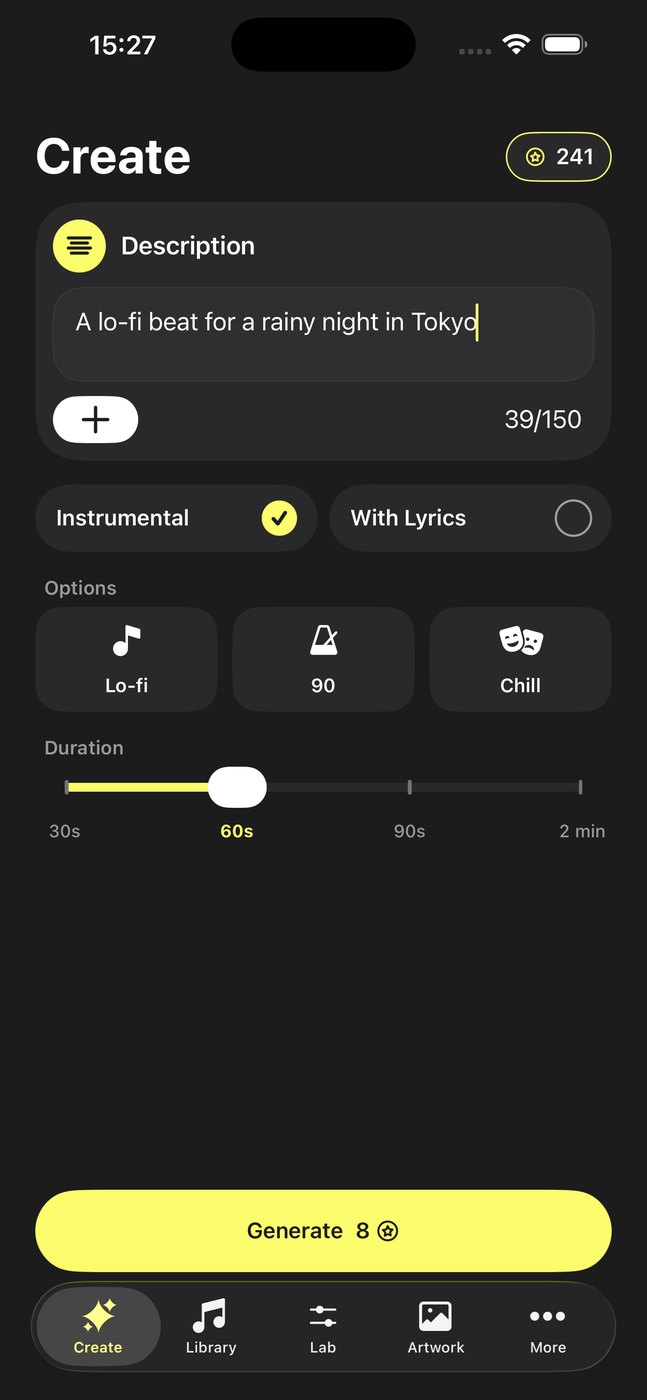
Leave the controls alone at first
Genre, mood, BPM, and duration can all be set explicitly, and the instinct is to set all of them immediately. Resist it. If your description says "a rainy night in Tokyo" and you also set the genre to Metal, you've asked for two different songs and you'll get the average of them.
The controls earn their place on the second pass, when you have a result that's close: same description, BPM nudged down, mood set explicitly, regenerate. That's a controlled experiment. Setting six things at once isn't.
| Control | Leave on Auto when… | Set it when… |
|---|---|---|
| Genre | Your description already names a sound | You want a specific one of the 29 and the text is ambiguous |
| Mood | The description carries emotion | The result came back emotionally flat |
| BPM | Almost always | The track is for something time-bound — a workout, a video edit |
| Duration | Never — pick this deliberately | Always. It changes the structure, not just the length. |
Instrumental or vocal
Instrumental is the safer default for anything the song sits underneath — a video, a podcast intro, background listening. Vocals are the point when the song is the thing itself, or when it's about someone.
With lyrics switched on you can write your own (up to 500 characters) or have them generated from the same description. Writing your own is worth it when specifics matter — a name, an in-joke, a place. Generated lyrics are better than most people expect at genre pastiche and worse at meaning anything in particular.
Vocals can be set to Auto, male, female, or child. You can also record your own voice once in the app and have songs sung in it. That's deliberately scoped to your voice — we don't build cloning of other people's voices, and we'd encourage the same caution wherever you find the feature.
Why the first result isn't the keeper
Generation has real variance: the same description twice gives you two different songs, both valid. That's not a defect to prompt around, it's the medium. The workflow that works:
- Write the three-ingredient sentence. Pick a duration. Generate.
- Listen once, all the way through. Decide what specifically is wrong — tempo, energy, instrumentation, vocal.
- If nothing is specifically wrong but it's dull, regenerate unchanged. Variance alone often fixes it.
- If something specific is wrong, change that one thing and regenerate.
- Keep the good ones. Generation is cheap; deciding is the slow part.
When to start from a template instead
For occasion songs — birthdays, love songs, songs about a pet — the Lab's templates set genre and mood for you and ask only what that occasion needs to know. It's a faster path than writing a description from scratch, and it's usually a better one, because the template already knows what makes that kind of song work. See the birthday song walkthrough for how that flow goes end to end.
Once you've got a track you like, the prompt-craft rabbit hole is in song prompts that work.
FAQ
How does AI text-to-song work?
You describe the song; the model composes and performs it, returning finished audio. In Musy AI the description is up to 150 characters, generation runs in the background, and most songs take about a minute.
What should the description say?
Genre or reference sound, mood, and a concrete subject. "A lo-fi beat for a rainy night in Tokyo" carries all three.
Should I set genre, mood, and BPM manually?
Not on the first attempt — controls that contradict your text pull the result two ways. Use them to move one specific thing on the second pass.
How long can an AI song be?
30 seconds, 60, 90, or 2 minutes. Shorter is often better: one strong idea beats two minutes of repetition.